01 · Targets
Point it at your ranges.
CIDR blocks, ranges and single IPv4 addresses — up to 65,536 per scan, with exclusions. Run it now or on a schedule from every 15 minutes to weekly.
DeviceManager's network device monitoring watches routers, switches, firewalls, access points, printers, UPS units, cameras and storage — agentless over SNMP, in the same self-hosted console as your endpoints, without using a licence seat.
Coverage
Network devices sit beside your managed endpoints in DeviceManager, but never on the Devices page and never on your licence count. Each one gets a NET number, a live status and a full history.
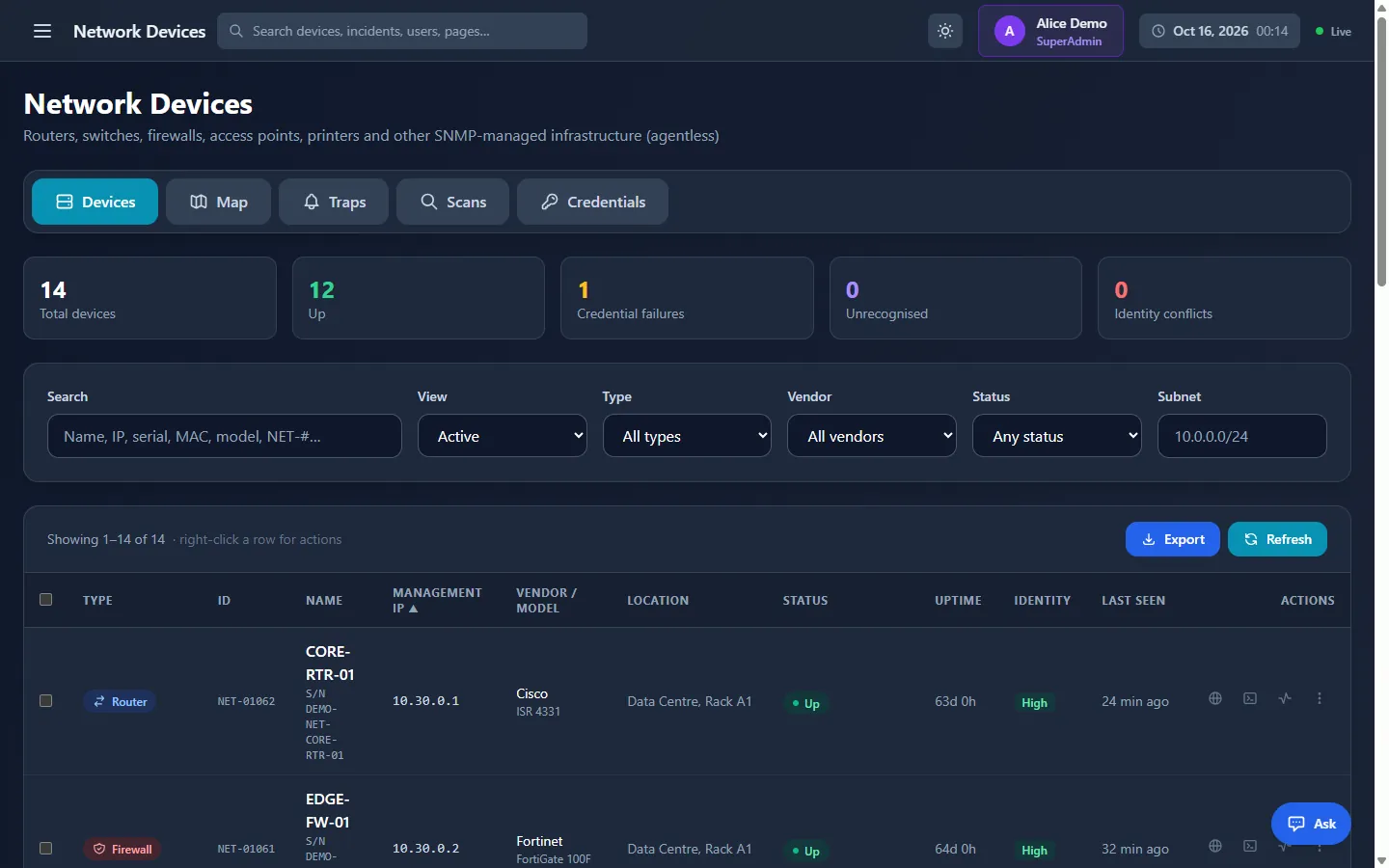 12 of 14 up
NET-01062 · identity High
12 of 14 up
NET-01062 · identity High
Discovery
Scans probe your ranges with SNMP credential profiles, then recognise each device by its hardware — never by its address.
01 · Targets
CIDR blocks, ranges and single IPv4 addresses — up to 65,536 per scan, with exclusions. Run it now or on a schedule from every 15 minutes to weekly.
02 · Credentials
SNMP v1, v2c and v3 profiles are tried by priority. A scoped profile is only ever sent inside its subnets, so nobody can aim a scan at a laptop to harvest community strings.
03 · Identity
Every device is recognised by chassis serial, base MAC or SNMP engine ID and gets a NET number. The IP is never identity, so a device that moves keeps its record.
04 · Change
Matching identifiers on two records are flagged, never merged automatically. New hardware at an old address is marked “possibly replaced by”, with asset and open incidents ready to transfer.
Targets one per line
10.30.0.0/22CIDR10.30.4.10-50Range10.30.9.1Single IPexclude 10.30.2.0/27≤ 65,536 addresses · every 15 min → weekly
Credential profiles tried in order
Identity confidence
Needs review nothing auto-merged
Topology map
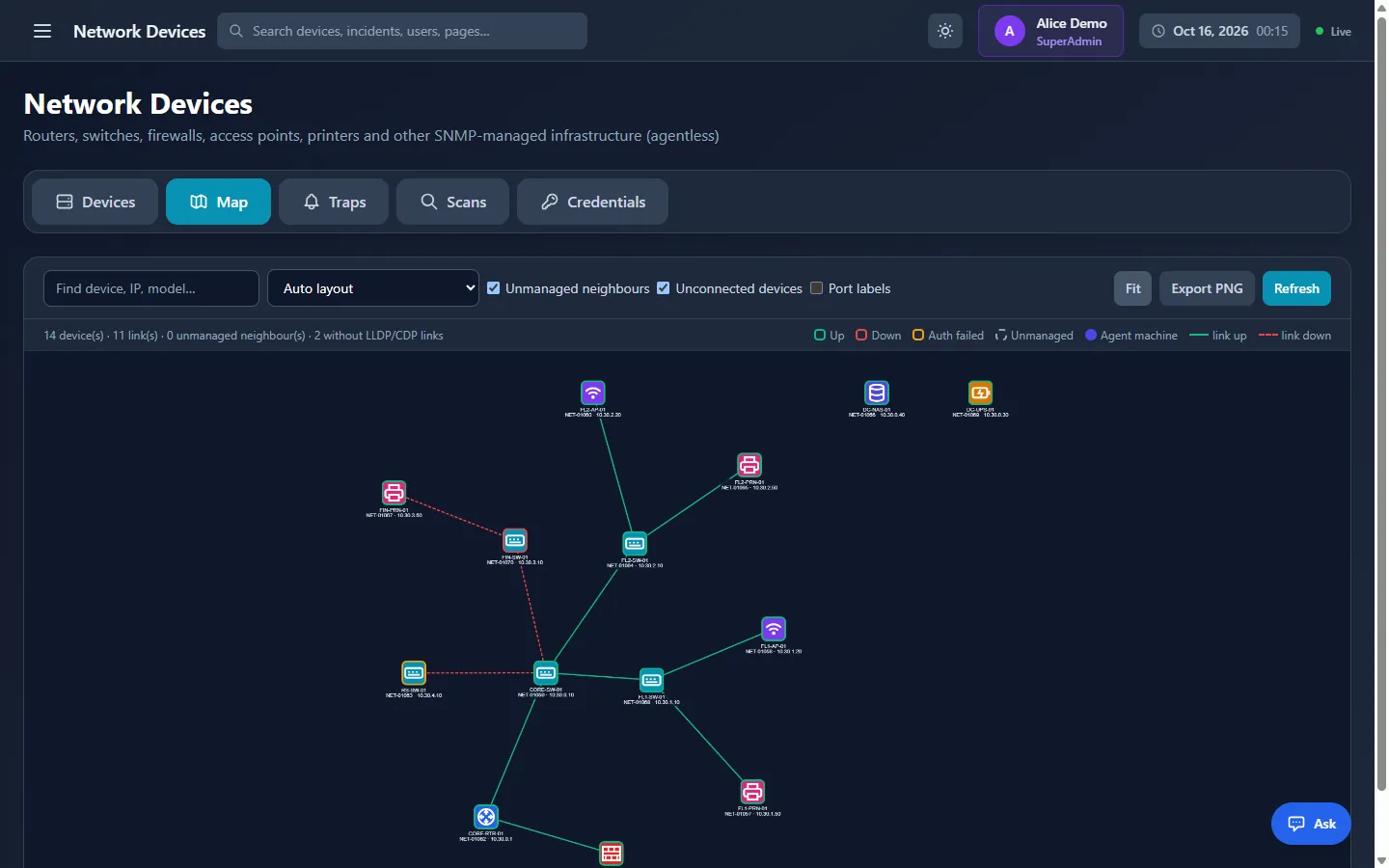
Enable LLDP — or CDP on Cisco equipment — and re-scan. The Map tab draws your network from the neighbour tables it read.
01 · LLDP & CDP
Each scan reads the LLDP and CDP neighbour tables of your switches and routers. Every adjacency becomes a link, with port labels when you want them.
02 · Layout
Choose Auto, Hierarchical or By connections, then drag nodes where you like — positions are remembered in your browser. Fit, refresh or export the map as PNG.
03 · Status
Down devices and links are coloured, refreshed every 30 seconds. Unmanaged neighbours show what they advertise, with Scan this IP to bring them under management.
04 · In the console
Select any device to open its details: interfaces, neighbours, recent traps, configuration backups and status history.
Neighbour table · CORE-SW-01
Gi1/0/1↔ FL1-SW-01 Gi1/0/48LLDP
Gi1/0/2↔ FIN-SW-01 Gi1/0/48CDP
Layout · Hierarchical (routers on top)
Drag to arrange · positions rememberedFitExport PNG
Legend · refreshes every 30 s
UpDownUnmanagedlink down
Status & incidents
Every device with working credentials is polled over SNMP every 60 seconds. Each change lands in its status history — and, with automatic incident sources on, in your incident queue.
Sixteen status polls, one per minute from 13:00 to 13:15: the polls from 13:05 to 13:13 were missed and the device answered again at 13:14.
Status history
Automatic incident
Opens when a device misses polls for 5 minutes (default) and closes when it answers again.
Also: Network Interface Down · Printer Supply Low
Watched uplinks, server and firewall ports raise an interface-down event when they drop while administratively up. Access ports stay unwatched — they flap all day.
Gi1/0/1UplinkupGi1/0/14Server portdown · eventGi1/0/22Access portdown · ignoredPrinter supplies
Every toner, drum, ink and waste container is read by scans and refreshed hourly. With Printer Supply Low switched on, a ticket opens at 10% by default — and closes itself when the supply is replaced.
Configuration backup
Back up running configurations over SSH — or Telnet, where you allow it — on demand or daily. A new version is stored only when the configuration really changed; time stamps and counters are ignored.
11 hostname CORE-SW-01
22 !
33 snmp-server location Data Centre, Rack A2
44 ntp server 10.20.0.10
5-logging host 10.20.0.14
5+logging host 10.20.0.15
6+logging trap informational
67 !
78 interface GigabitEthernet1/0/14
8- description CAM-FL2
9+ description CAM-FL2-LOBBY
10+ power inline static
911 !
1012 end
Command sets
Secure terminal
Open a terminal from any device's row or details. It connects from the DeviceManager server to the device's management IP, after you re-enter your DeviceManager password.
Compare the fingerprint, trust it once, and a changed key is refused from then on.
Who, which login, when and for how long — with an encrypted transcript where typed passwords are stored as [redacted].
Host key ssh-ed25519 SHA256:q7Vd3kR0Lx9pWmN2cT8sYf…
✓ Trusted & pinned on first connection
CORE-SW-01> enable
Password: ••••••••••
CORE-SW-01# show version | include uptime
CORE-SW-01 uptime is 63 days, 0 hours
CORE-SW-01# exit
Stored transcript · encrypted
Password: [redacted]
CORE-SW-01# show version | include uptime
Traps & tools
Receive SNMP v1 and v2c traps and v2c informs on UDP 162. Common traps are named and summarised — and the ones that matter trigger work straight away.
upsOnBatteryCriticalUPS running on batterylinkDownWarningGi1/0/14 down → re-poll nowlinkUpInfoGi1/0/14 back upciscoConfigManEventInfoConfiguration changed → backup queuedauthenticationFailureWarningSNMP authentication failureprinterV2AlertWarningPrinter alert raisedcoldStartWarningDevice restarted → re-poll nowwarmStartInfoWarm start → re-poll nowLink and restart traps trigger an instant re-poll; config-change traps queue a backup.
Only inventoried devices or added sources. Floods over 120 a minute per source are dropped.
Ping, traceroute and a port check of common management ports — every run audited.
The trap receiver is off by default and runs per server; it is switched on in the server configuration. SNMPv3 traps and traps from ignored devices are dropped.
Security by design
Community strings, SNMPv3 keys and logins are encrypted and hidden after saving.
A scoped credential is only ever sent to addresses inside its subnets.
Terminals, merges, deletes, backups and credential changes ask for your password again.
Revealed after re-confirmation, recorded, and hidden again after 60 seconds.
Web-UI launches, config views, transcript views and tool runs are all logged.
Seven permissions, from View and Scan to Connect and View Config.
Network devices work with the rest of the self-hosted console.
Link a device to an asset record; it carries a NET badge.
Create incidents from any device, or let them open and close automatically.
Ask about network devices: “Which printers keep giving problems?”
Pair network visibility with agent-based vulnerability assessment of endpoints.
FAQ
Let's talk
See discovery, the topology map and configuration backup in a tailored demo, then plan a pilot that starts with one known switch and one printer.