DeviceManager 7.0Self-hosted UEM & RMM

Every endpoint. One console. Fully under your control.

Self-hosted unified endpoint management and on-premise RMM for Windows and Linux. Discover, secure, patch and support every endpoint from one console — without sending your data to anyone else's cloud.

  • Windows & Linux parity
  • Runs on your servers
  • Signed policies & packages
  • Self-healing agents
dm.yourcompany.local/dashboard
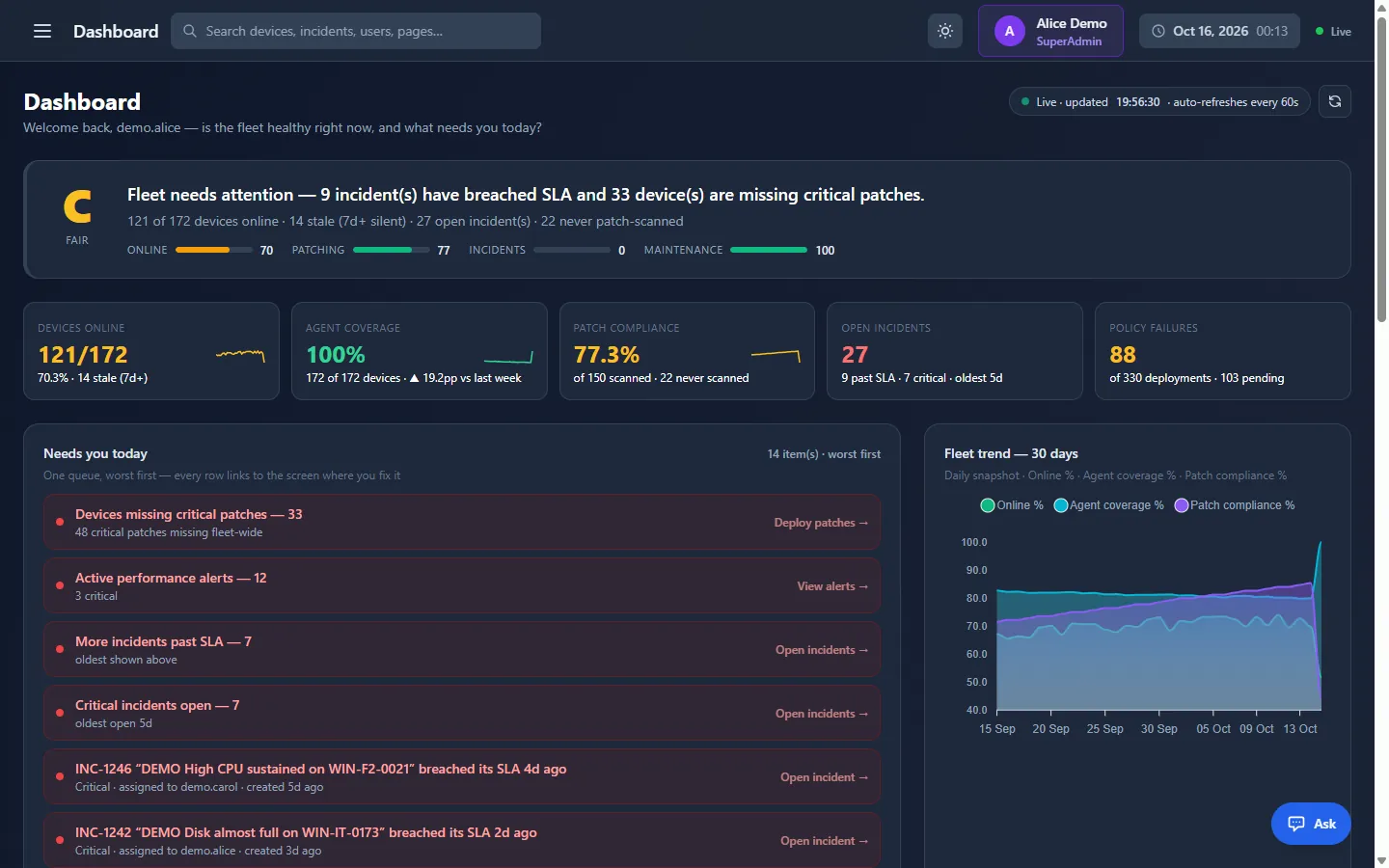
DeviceManager 7.0 dashboard with the fleet health grade, devices online, agent coverage, patch compliance, open incidents and the Needs you today queue
The DeviceManager dashboard: one A–F health grade for the fleet, live KPI cards and a worst-first queue of what needs attention.

The challenge

Endpoint management got fragmented. We put it back together.

Problem 01Tool sprawl: separate products for RMM, patching, remote access, assets and USB control.

One unified console

RMM, patching, remote support, asset management and endpoint security in one web console — no tool-hopping and no blind spots between products.

Problem 02Cloud dependency: your endpoint data lives in a vendor's cloud.

Self-hosted and sovereign

DeviceManager runs on your own server with your own SQL Server database. Agents connect to you over HTTPS — never to a vendor cloud, never to a third party.

Problem 03Linux blind spots: Linux machines stay unmanaged or sit on a second tool stack.

True Windows and Linux parity

The same workflows, policies and reports for both — each enforced with the operating system's own engine, not a Windows tool with a Linux afterthought.

Problem 04Security exposure: weak access control, no audit trail, unsigned commands.

Secure by design

Server-checked roles, TOTP MFA, AD/LDAP sign-in, encrypted secrets, signed commands and packages, and a complete exportable audit log — built in, not bolted on.

How it works

One policy. Every endpoint.

One push from the console — signed by your server and delivered live over each agent's encrypted connection.

Administrator Pushes one policy to an OU
DeviceManager server Signs & distributes RSA-signed 3 results returned
Endpoint · Windows 11 Waiting for policyApplication blocked
Endpoint · Ubuntu Waiting for policyUSB device blocked
Endpoint · Debian Waiting for policyPackage installed
  1. 01 · PushAn administrator assigns one policy to an organizational unit.
  2. 02 · Sign & deliverThe server signs it and sends it live over each agent's encrypted SignalR (HTTPS) connection.
  3. 03 · EnforceEach endpoint applies what it receives — an app blocked, USB locked, a package installing.
  4. 04 · Report backResults return to the console; a device that was offline catches up with the real timestamps.
  • Keeps enforcing offlineLast policies stay enforced; results sync later with real timestamps.
  • Guarded by a watchdogA separate service, sharing no code with the agent, repairs it.
  • Inherited like Group PolicyPolicies flow down the OU tree; Enforced rules pierce blocks.

Product tour

See the whole fleet. Act on any of it.

01 Dashboard

Fleet health, graded at a glance

One A–F grade weighs online devices, patching, incidents and maintenance. Live KPI cards and a worst-first “Needs you today” queue link straight to where you fix things.

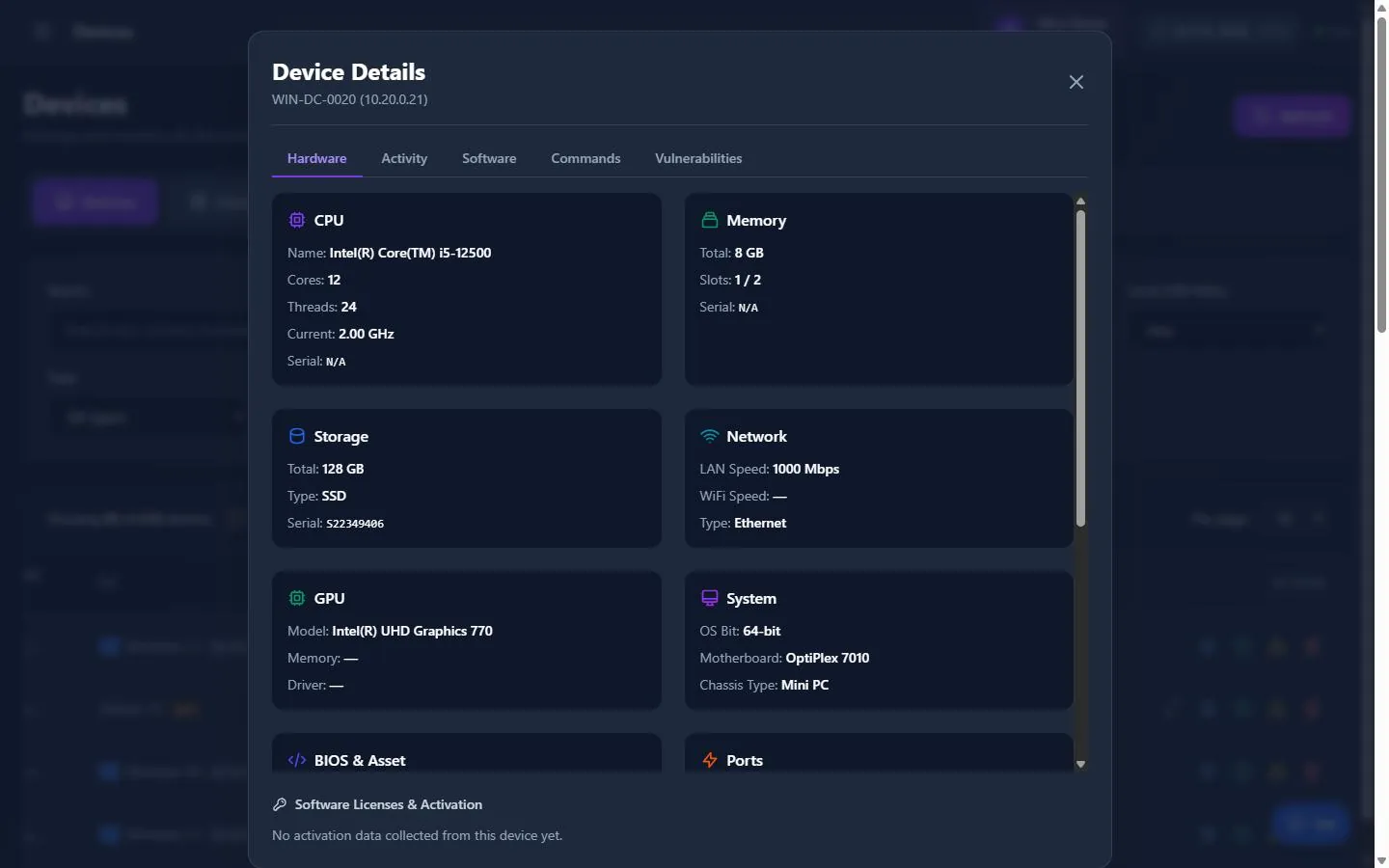
02 Devices & inventory

Every device, in full detail

Hardware, software, peripherals, patches, commands and vulnerabilities for every Windows and Linux device. Search any column; reboot, message, wake or regroup devices in one bulk action.

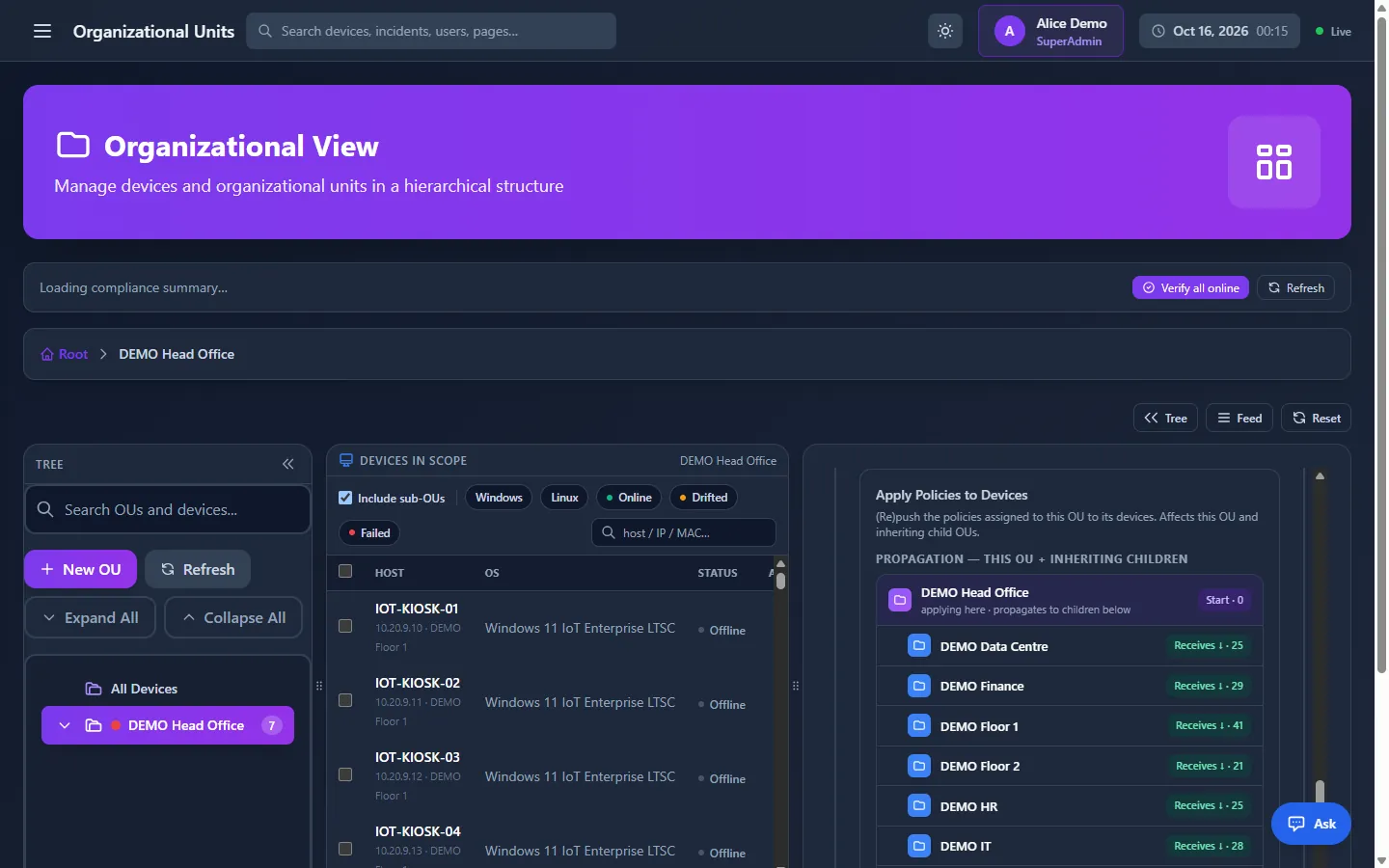
03 Organizational units

Policies that flow down the tree

Organise devices by site, department or role. A policy assigned to an OU reaches every device below it — with a propagation preview, drift detection and a 30-day compliance trend.

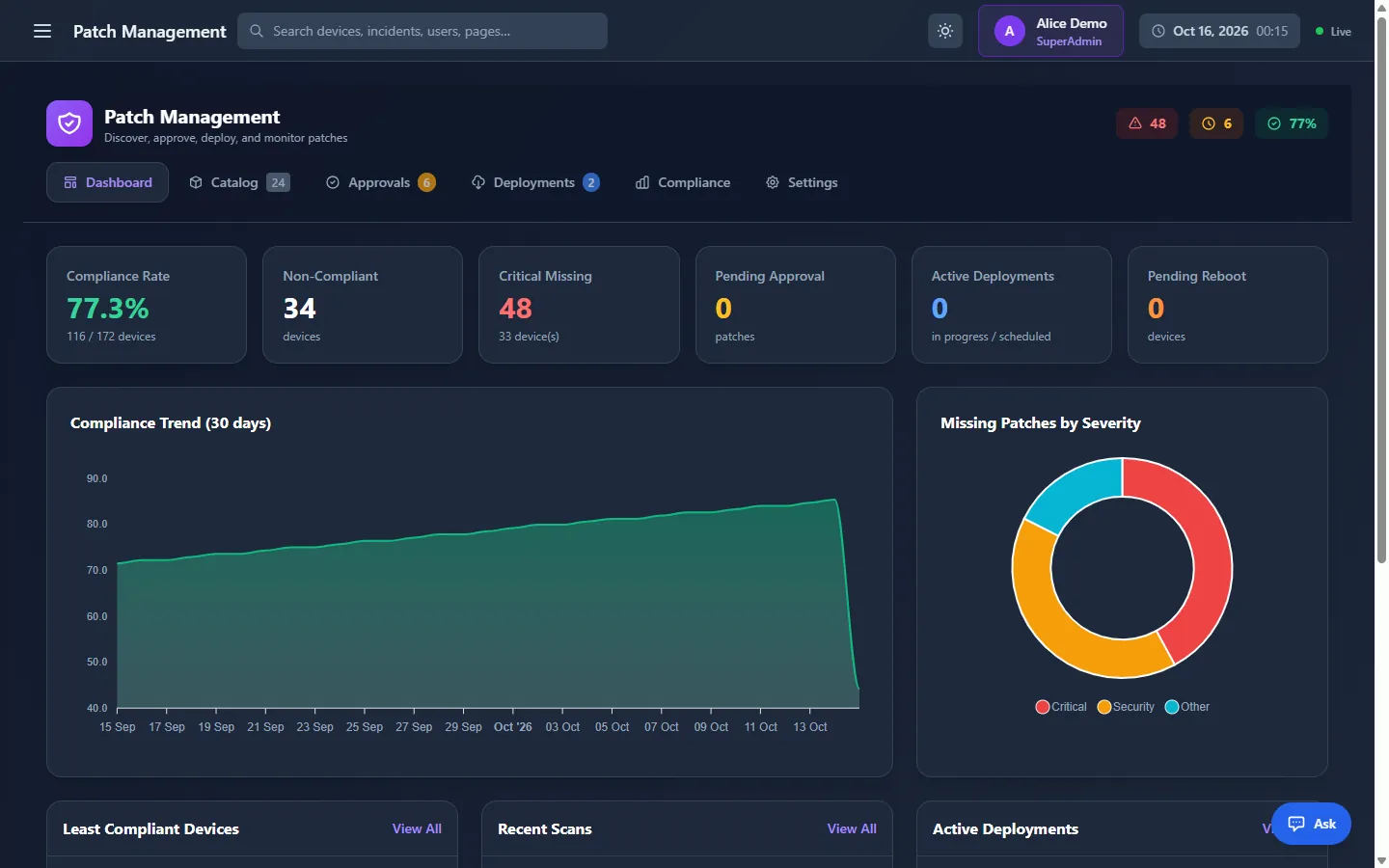
04 Patch management

Patch management for Windows and Linux

Scan, approve, deploy and verify OS updates from Windows Update or WSUS, apt and dnf — with auto-approval rules, maintenance windows, five reboot options and one compliance score.

ScanApproveDeployVerify

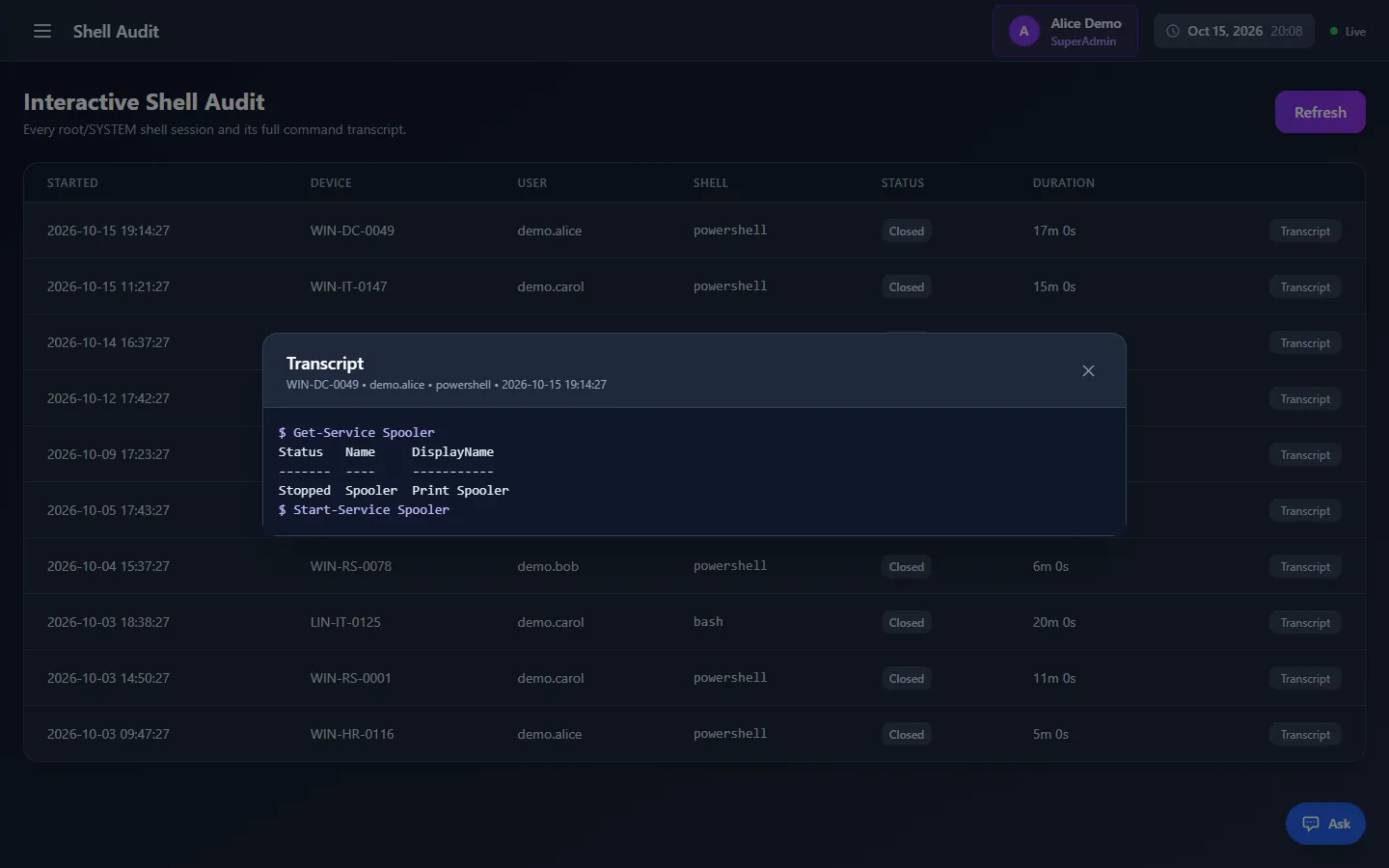
05 Remote support

Remote desktop without VPN

Browser-based remote desktop, file transfer, processes, logs and settings. Sessions run through your server, so devices need no inbound port. Optional user consent; every session audited.

dm.yourcompany.local/dashboard dm.yourcompany.local/devices dm.yourcompany.local/organizational-view dm.yourcompany.local/patch-hub dm.yourcompany.local/remote-shell-audit
DeviceManager dashboard close-up: fleet health grade with online, patching, incidents and maintenance scores, KPI cards and the Needs you today list
Health grade A–FWorst first
Device Details window on the Hardware tab with CPU, memory, storage, network, GPU and system information for one managed device
Hardware · software · patchesSearch any column
Organizational View with the OU tree, devices in scope and a propagation preview showing how a policy reaches each child OU
Propagation previewInherited down the tree
Patch management hub with compliance rate, critical missing patches, pending approvals and a 30-day compliance trend
Compliance rateWSUS · apt · dnf
Interactive shell audit listing recorded root and SYSTEM sessions, with the full transcript of one PowerShell session open
Full session transcriptsNo inbound ports

Policy & control

Lock down, deploy, update. One enforcement model.

USB, application, command, package and Write Filter policies — and A/B OS updates — reach devices or organizational units the same way, and every device reports what it really enforces.

USB Device control

USB device control by class and vendor

Allow signing dongles and printers, block USB storage, permit a webcam only from an approved vendor. Rules run top-down the moment a device is plugged in; the first match decides.

Linux · USBGuardWindows · install restrictions

APP Application control

Allow-lists and block-lists for apps

Block named applications, or allow only an approved set. Enforcement uses AppLocker on Windows and AppArmor on Linux — from boot, even while the server is unreachable.

Blocked launches reportedSigned payloads

CMD Command policies

Scripts as policy, in scheduled windows

Group PowerShell and Bash commands into policies with Apply and Remove scripts, run-once or every-sync modes and time windows. Agents refuse unsigned or altered commands.

Retried up to 5×Full execution logs

PKG Software deployment

Signed software deployment at scale

Roll out .msi, .exe, .msix, .deb, .rpm or encrypted packages in batches. Each device downloads with a single-use token, verifies the SHA-256 hash and installs silently.

Batches of 5–100Never installed twice

UWF Kiosk lockdown

Kiosk lockdown for Windows IoT

Write Filter policies keep Windows IoT Enterprise and LTSC devices in a defined state: UWF overlay, exclusions, Shell Launcher and Keyboard Filter. The agent converges on its own, reboots included.

Reboot safety capFail-safe: never left unprotected

OTA A/B updates

OS updates you can’t break

Linux thin clients receive the new image in their spare slot while they keep running, switch with one reboot, and roll back by themselves if it fails to boot.

Per device or per OUSuperAdmin-only · audited
Agent health & recovery

An agent that heals itself.

A separate watchdog — sharing no code with the agent — checks its heartbeat every 30 seconds. When it goes stale, it climbs a recovery ladder one rung at a time and stops the moment the agent is healthy.

  • 30 sheartbeat
  • 2 minstale = unhealthy
  • 8recovery rungs
Heartbeat stale · 2 minRecoveringAgent healthy
  1. 1Service checkReports a missing service; leaves one an admin disabled alone.
  2. 2Restart, up to three timesRecovered only when the agent stays up for a full minute.
  3. 3Crash-loop detectionFour restarts in ten minutes counts as broken, even with a fresh heartbeat.
  4. 4Network diagnosticsDNS, gateway, internet and server reachability.
  5. 5Narrow firewall repairOutbound allow rules to the server only — never inbound, never firewall-off.
  6. 6State resetClears the agent's cached state and restarts it.
  7. 7Configuration restoreRestores the agent's settings from a known-good backup.
  8. 8Reinstall with rollbackVerified package, snapshot first — restored automatically if the new agent fails.

Shown: the full ladder; the watchdog stops at the first rung that works. At most two reinstalls per device per day, and every event appears on the Recovery page.

Monitoring · incidents · location

From alert to accountable ticket.

Incident management

12 automatic incident sources

Each source has its own threshold, dedup window and auto-resolve; a flood cap stops one noisy device from burying the queue.

Critical performanceDevice offlineBlocked USB devicesCommand failuresWatchdog recoveriesNetwork device downInterface downPrinter supply lowPatch install failuresDisk almost fullPolicy not enforcedExploitable vulnerabilities

Performance alerts

Alerts that name the culprit

CPU, memory, disk and network rules capture the top processes when they trip; culprit analysis flags repeat offenders.

CriticalRAM 96% · sustained×3

> 10 alertsavg CPU > 70%on > 3 devices

SLA · escalation · channels

Nothing waits unnoticed

  • Critical30 min · 1 day
  • High2 h · 3 days
  • Medium8 h · 7 days
  • Low1 day · 7 days

Default response · resolution targets; 24/7 or business hours with holidays.

  1. No response in time
  2. E-mail people
  3. Reassign
  4. Raise priority

SlackMicrosoft TeamsHMAC-signed webhooks

Device location

Know when a device turns up somewhere it shouldn’t

Allowed countries, impossible travel, VPN and hosting detection — looked up in local GeoIP databases. Nothing is sent to a third party.

New in DeviceManager 7.0

Four new modules. Same console.

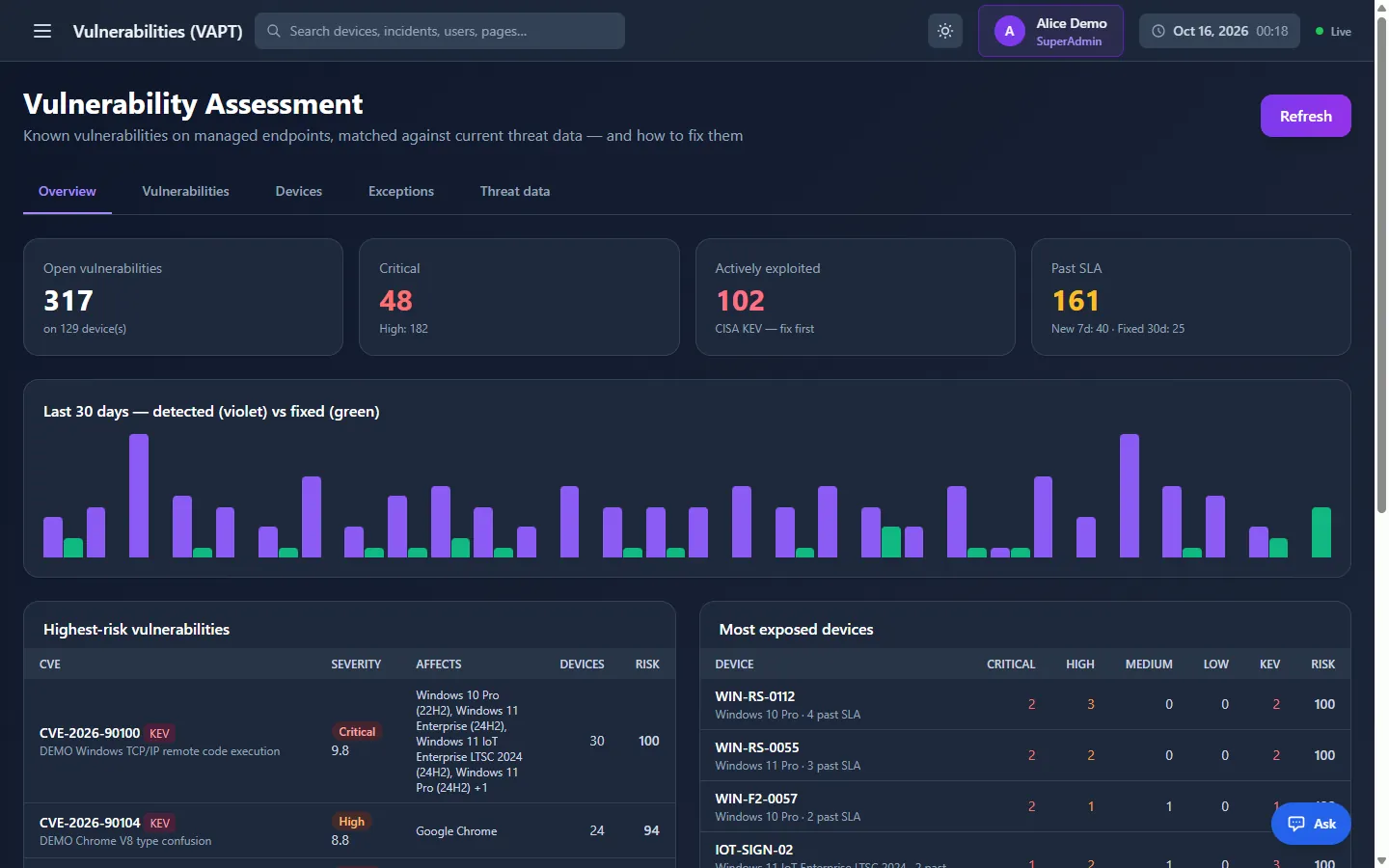
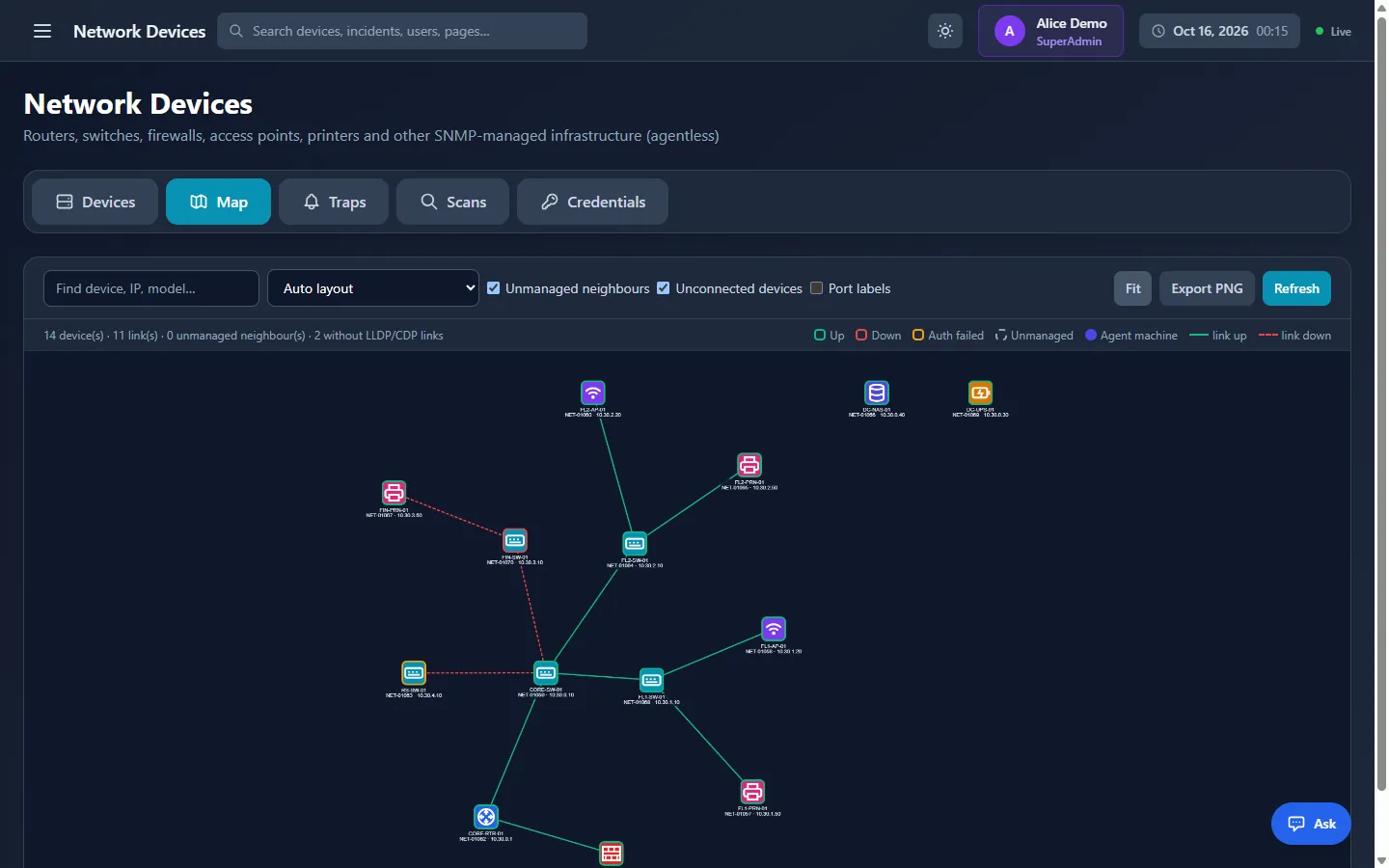
Network map of routers, switches, firewalls, access points and printers discovered over SNMP

Network devices

SNMP network monitoring

Agentless SNMP v1, v2c and v3 for switches, firewalls, printers and UPS — no licence seats.

Explore network monitoring

AI Assistant

Ask your fleet

Plain-language, read-only answers from your fleet data, with a cloud or local model.

Explore the AI Assistant
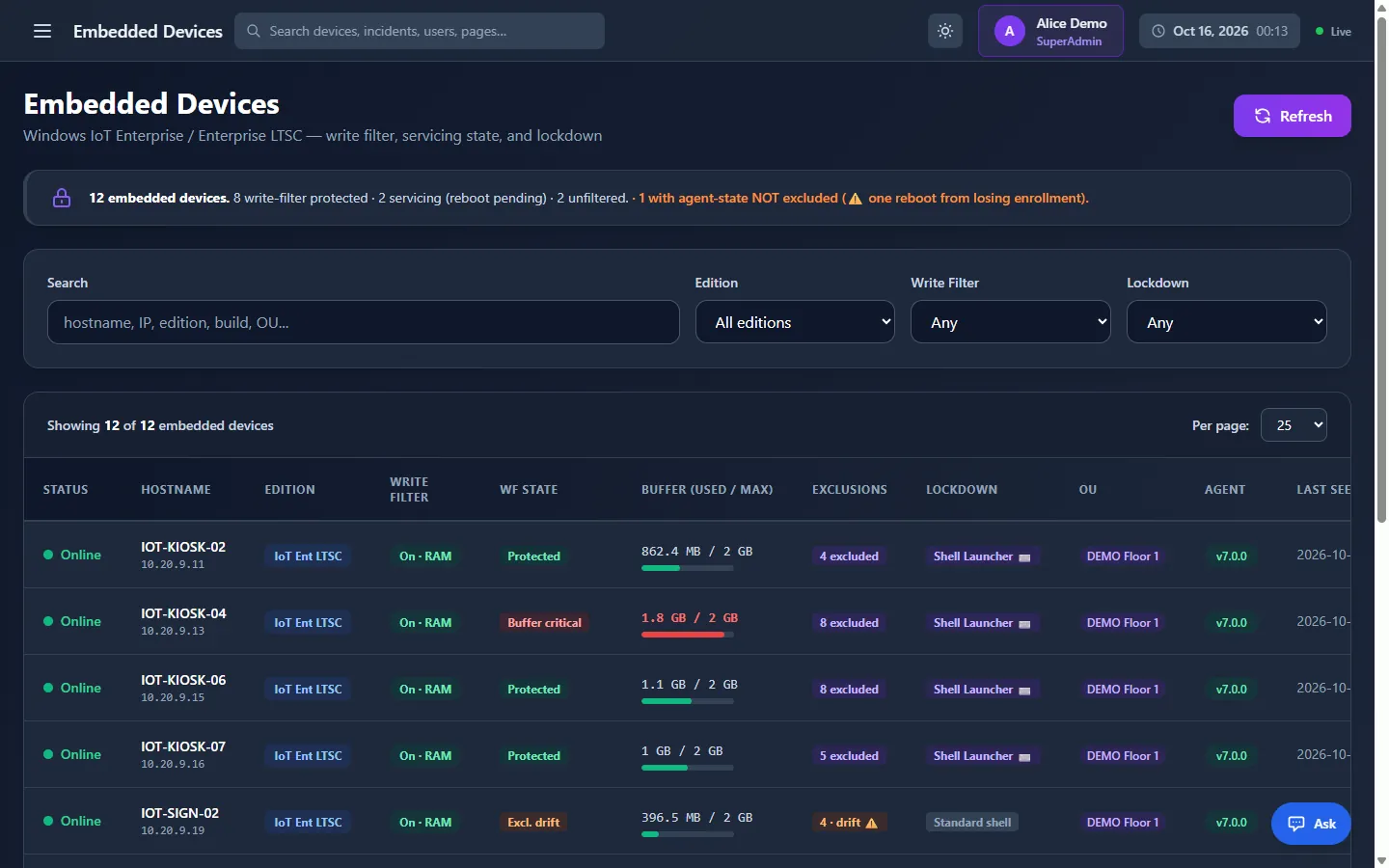
Embedded Devices page listing Windows IoT Enterprise LTSC kiosks with write filter state, overlay usage and Shell Launcher lockdown

Write Filter Manager

Kiosk lockdown

UWF overlay, exclusions, Shell Launcher and Keyboard Filter as policy for Windows IoT and LTSC.

See kiosk lockdown

Security & governance

Security built into the foundation.

Built to satisfy security and compliance teams from day one.

  • Five built-in roles plus custom roles
  • Every action re-checked on the server
  • Destructive actions SuperAdmin-only, with password re-confirmation
  • TOTP MFA and Active Directory / LDAP(S) sign-in
  • Secrets encrypted at rest; RSA-signed payloads
  • Complete, exportable audit log
Built-in rolessimplified from about 175 permission codes
RoleViewDeploy policiesRemote desktopRemote commandsDeletes & shell
SuperAdminYesYesYesYesYes
AdminYesYesYesYesNo
ManagerYesYesYesNoNo
EngineerYesYesYesYesNo
UserYesNoNoNoNo

+ custom roles · nobody can grant rights they don't hold

IT asset management

Warranty, lease and depreciation; licence seats and compliance.

13+ reports, scheduled

CSV, Excel and branded PDF, a per-device PDF dossier, e-mail schedules.

Audit & system logs

Who did what, and what the platform did itself — exportable.

Technical controls that support compliance with

  • RBI
  • SEBI CSCRF
  • CERT-In
  • DPDP
  • PCI DSS
  • HIPAA
  • NIST
  • CIS

Audit-ready technical controls that support compliance. Formal certification is a separate, third-party engagement.

Deployment

Up and running inside your environment.

  1. Step 1

    Install the server

    On your own hardware or VM, with SQL Server.

  2. Step 2

    Discover & deploy

    Scan by LAN, IP range, subnet, DNS, DHCP or hostname; push agents to Windows and Linux.

  3. Step 3

    Approve & organise

    Approve each enrollment once and place devices into organizational units.

  4. Step 4

    Manage at scale

    Apply policies, patches, monitoring and remote support across the fleet.

75+Built-in management modules
100%Endpoint data kept on-prem
2OS families, one console
24/7Self-healing agent uptime

How it compares

Positioned where it matters most.

DeviceManager compared with typical cloud-only RMM, cloud UEM suites and hybrid UEM suites
CapabilityDeviceManagerCloud-only RMMCloud UEM suitesHybrid UEM suites
Deployment modelSelf-hosted, on your serversVendor cloud onlyVendor cloudOn-prem or cloud
Windows + Linux parityFull, native enginesPartialLinux limitedPartial
Data stays on your networkYes — 100%NoNoVaries
Self-healing watchdog agentYes, independent serviceTypically noTypically noTypically no
White-label / OEM readyYesRarelyNoRarely
Signed remote commandsYes, RSA-signedVariesN/AVaries
Air-gapped operationYes, incl. offline threat dataNoNoVaries

Competitive positioning is directional and varies by vendor, edition, version and add-ons.

Who it's for

Built for organisations that can't compromise on control.

Regulated enterprises

Banks, healthcare and government, where data sovereignty and audit are non-negotiable.

Mixed Windows + Linux estates

Data centres and engineering teams running both, from a single console.

MSPs & OEMs

White-label the platform and deliver managed endpoint services under your own brand.

Distributed & edge sites

Branches, kiosks and thin clients needing lockdown, self-healing and safe A/B updates.

FAQ

Questions buyers ask first.

What happens when a device loses its connection to the server?
The agent keeps enforcing the last policies it received and stores its results on disk, then delivers them with the time they really happened once the connection returns.
Which operating systems does DeviceManager manage?
Windows and Linux desktops, laptops, servers, thin clients and kiosks, including Windows IoT Enterprise and LTSC. Patching covers Windows Update or WSUS, apt (Ubuntu, Debian) and dnf (RHEL, Rocky Linux, AlmaLinux).
Where does our endpoint data live?
On your own infrastructure: a Windows server you control, with all state in your SQL Server database. Online threat-data sync or a cloud AI model are optional, and each has an offline alternative.
Can vulnerability assessment run in an air-gapped network?
Yes. Turn online sync off and import signed threat-data bundles exported from an internet-connected DeviceManager server; the isolated server verifies each one. No network scanning is involved. More on DeviceManager VAPT
Can MSPs and OEMs white-label DeviceManager?
Yes. DeviceManager is white-label and OEM-ready, so MSPs and OEMs can deliver endpoint management under their own brand. Ask us about branding and licensing.
How is DeviceManager licensed?
Per managed device: each approved device uses one licence seat, and SNMP network devices use none. A signed entitlements file enables the modules you purchased.

Let's talk

Ready to bring every endpoint under one roof?

See DeviceManager mapped to your environment: a tailored live demo, a pilot on your own hardware, and a clear deployment and licensing plan.